
The AI Starter Kit: Activating your AI Future
Build a solid AI foundation with the RISE prompting framework, context engineering techniques, and curated tools. Learn how to write better prompts, develop reusable AI skills, and implement an actionable leadership roadmap for AI adoption.

Executive Summary
- Apply the RISE Framework to prompts for more structured results.
- Skills or external process files allow for repeatable (scalable) processes.
- Context leaks will ruin outputs, refresh often.
- Explore AI tools in your own time. NotebookLM, Gemini Canvas, and Futuretools.io provide solid places to start.
Introduction: AI Momentum
Business leaders can't turn their heads without being hit from all sides with AI content. It may feel like the hype has exceeded reality by several orders of magnitude, but there is still value from effectively engaging with AI and understanding how it can impact workflows. At time of writing, OpenAI and Anthropic are jockeying for position with enterprise clients and both want to tap into legacy industries to maintain their growth. Both can solve a lot of your needs but there are foundational things to know before exploring AI solutions.
This article will build a solid foundation for future AI discussions by providing a framework for writing better prompts, sharing tools teams can develop outside of the chat window, and highlighting a few standouts across the landscape right now.
Section 1: Prompting 101
While the root cause of AI slop is lack of human oversight, a secondary cause is the lack of good prompts even with oversight. Teams should be reviewing and refining AI output before putting it in production or sharing it in a readout. However, you may need an AI to give you a framework to help develop foundational prompts to build off over time. To that end, we'll briefly cover the RISE framework that's quickly become an industry best practice for non-technical users.

As AI-enabled teams mature, they'll naturally stumble across a few of these elements, but at a high level every prompt should include a few elements. This is obviously not an exhaustive list.
- Role: What is the persona the LLM should adopt? This could be anything from a Chief Data Officer to a PHD in Rhetorical Communication. The role determines the framework that the LLM will apply and what it will prioritize as part of the output. Here's one of my favorites:
- Act as an antagonistic scholar. Outline and challenge the core assumptions of my post, and make me defend them.
- Intent, AKA Task Statement: The more instruction you provide an LLM, the better the result you'll get. Imagine the output comparison between asking for a review and asking an LLM to apply a structured rubric. This can be a multi-step process, but the more structured the task the better the result. Quick example:
- Think through my request step by step and develop a framework for evaluating my LinkedIn Posts based on the visibility algorithm. Once that framework is complete, apply it to this idea.
- Specification, AKA Output Scoping: Providing a clear framework will almost always provide a better result. I've done everything from asking for an exportable table to requesting a full narrative or even a poem. (Look up Adversarial Poetry when you have time).
- Your output should be a score of one to ten based on the criteria you defined. Explain each individual score across the rubric and provide a few bullet points that might help me improve my score.
- Exclusions, AKA Limits: What do you not want the LLM to do? Continuing our rubric example, you can reinforce the output by reducing what it can generate. You can also use negative instructions to force specific outputs or grounding techniques.
- You will not rewrite the post or provide a revised version.
- You will not generate an image.
- You will not share any of the context or analysis outside of the output I specified.
- You will not share any information that is not directly referenced in the source documentation.
After applying this framework, you should be able to think through exactly what you want the LLM to produce and apply these techniques to drive towards those results.
Section 2: AI as an Ecosystem (You Have More Tools than you Think).
Going beyond the prompt, there are a world of techniques that are being developed as models mature. One of the biggest trends is the movement towards context engineering opposed to prompt engineering. You can dramatically simplify prompts and ensure repeatable outputs by expanding the context window with your own content. This section will cover developing LLM skills, managing context creep, and some foundational grounding tricks.
At the highest level, skills are external files that define a process or criteria that can be added to the context window to ensure the LLM follows specific steps as opposed to generating their own. The best example I've seen for this is an HTML review skill developed by Torq's digital practices. It would review each generation to follow industry best practices for front end code and even define some of the specific criteria like hex codes.
I don't need to explain how repeatability is key to scale, but having a predefined process also enables more specific reviews. "Skip steps 1 through 7 and only apply the review for our knowledge article pages" or "This is a fresh development so enable Full Send and go through every step in detail." While counter-intuitive, a defined flow allows for more flexibility than an open one.

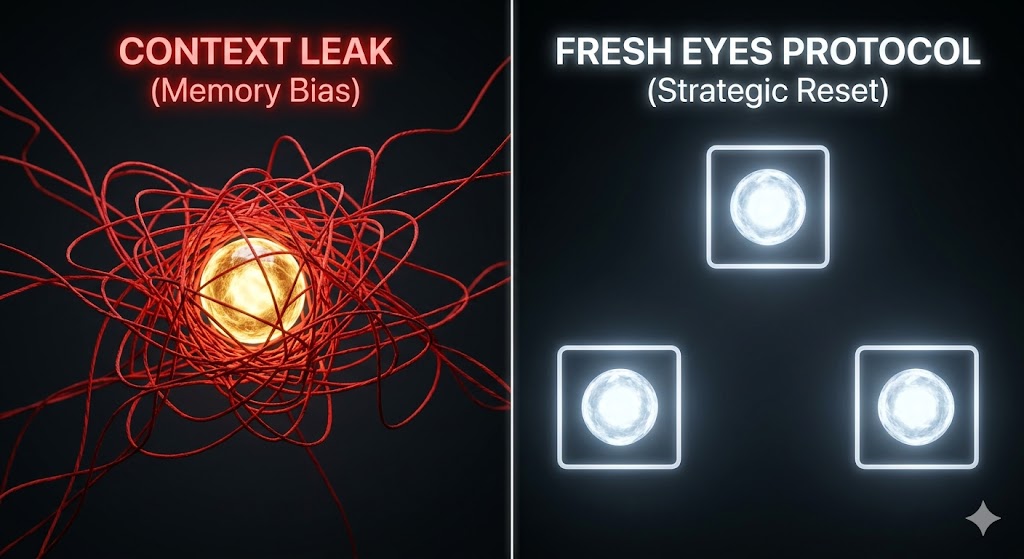
While skills are incredible for the development process, there's also a chance they overload the context window if there's a lot of development in one instance. This can lead to context leaks where instructions are forgotten, content becomes warped, or simply put, the LLM becomes confused by the amount of information available.
To combat this, teams can aggressively open new instances and transfer outputs between them. By refreshing every few chats, you can ask a new LLM for feedback and avoid generation bias. Don't be scared to ask the LLM to capture the key points of the conversation to copy into a new window. I call this the Fresh Eyes Protocol. The same logic already exists across development teams with peer review and external QA, so why would you not apply it to AI?
One final trick to be aware of is retrieval augmented generation, or RAG. Commonly called grounding, this process is largely an instruction layer of the prompt that tells the LLM to review a piece of text or research and use that as the primary source for its responses. The best consumer example of this would be Alphabet's NotebookLM, but more on that later. To achieve some form of grounding in your own prompts, provide the files as an attachment or create a custom GPT that includes those as source files. You can then instruct the LLM to cite specific examples of the text for its output, though I personally require it to provide links and exact quotes to avoid any potential hallucinations.
The key thing to remember is there are a lot of options around your prompt that are likely impacting the quality of the output and you can influence them in your favor as you grow as an AI practitioner.
Section 3: The AI Leaders' Tool Kit
While prompting is half the fun, picking the right tool is critical. This last section will briefly summarize three excellent resources that you can immediately tap into as a consumer to start building your AI skillset.
My personal favorite tool right now is NotebookLM. As mentioned above, the tool allows you to ground outputs in specific texts by only referencing the artifacts you load into each "Notebook." I recommend you upload ten to fifteen core knowledge articles before explaining your goals and asking if there are any knowledge gaps in the provided chat. This meta review has helped my output quality dramatically and enables some of the other features within NotebookLM. From Infographics to Podcasts, NotebookLM's generation features are functionally unrivaled. Once created, the knowledge base within notebooks can be applied to almost anything.
Operationalizing that knowledge is another question entirely, and for that I default to Gemini Canvas. While not quite as skilled as Claude, the Canvas tool allows users to build everything from slide decks to websites. I primarily use it as a prototyping tool or thought starter, but I've seen users go from idea to operations in days using it.
Last but not least, check out futuretools.io, which consolidates all the new AI tools in one place for easy filtering. If you're looking to learn about the AI ecosystem, you can see the breadth of it on this site.
Conclusion: Leadership Implementation Roadmap
Throughout this piece, we've covered everything from Prompt Engineering to generating your own podcast, but I want to end by narrowing the scope to your immediate next steps.
The Implementation Roadmap:
Phase One - Identify the Core: Define two or three specific use cases and document what part of that process needs AI and what the desired outcome would be.
Phase Two - Establish the Protocol: Apply the systems we've discussed through this article to those and use that as the baseline for your AI playbook long term.
Phase Three - Institutionalize the Asset: Aggressively iterate on those prompts and the systems around them. Don't be scared to toss it in PowerPoint first to give the AI something to anchor to. Your goal at this point is to build your first AI playbook so you can refine it alongside your tech stack.
Finally, if you need additional support, reach out to Torq for an AI Readiness Audit, and we can support this entire process from conceptual analysis through iteration and change management.